PixelGaunt › Games › Move & Merge
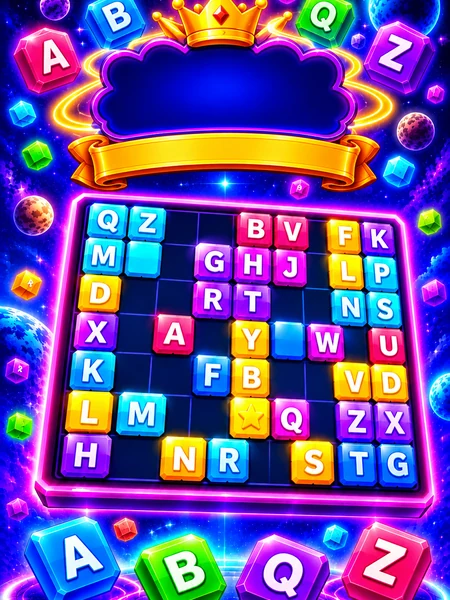
Move & Merge
Move & Merge is a free online puzzle game you can play right in your browser on PC, Android and iPhone. No download and no sign-up.
▶ Play Move & Merge NowAbout Move & Merge
Drag a piece into a gap; it slides only through empty space, so it needs a clear path. Connected blocks are one piece and always move together. Spell all the words on the list, left to right or top to bottom, and each finished word vanishes. The level is clear only when every block is gone. 100 levels, stars for fewer moves, and your progress saves on your device.
Controls
PC: drag a block with the mouse into a free gap. Undo takes back your last move, Restart resets the level, Pause or Esc / P opens the menu. Phone: hold it upright (vertical) or sideways, drag blocks with your finger and tap the buttons.
Game details
- Genre
- Puzzle
- Platform
- Web Browser (Desktop & Mobile Responsive)
- Price
- Free
- Publisher
- PixelGaunt
How to play Move & Merge
Drag a piece into a gap; it slides only through empty space, so it needs a clear path. Connected blocks are one piece and always move together. Spell all the words on the list, left to right or top to bottom, and each finished word vanishes.
Move & Merge controls
- PC: drag a block with the mouse into a free gap
- Undo takes back your last move, Restart resets the level, Pause or Esc / P opens the menu
- Phone: hold it upright (vertical) or sideways, drag blocks with your finger and tap the buttons
Tips for Move & Merge
Puzzle games are about planning ahead, spotting patterns and making the best use of limited moves or space.
- Read the word list first and find each word's letters on the board before you drag anything. Start with the word that is closest to complete.
- Connected blocks are one piece, so check where a whole group will land. A big group can cover the gap you need later.
- Every block has to disappear, so count the letters: a block that belongs to no word will be left over at the end.
- Use Undo freely to test ideas, and use Restart when the layout is clearly wrong. For three stars, look for drags that spell a word and open a path at the same time.
Move & Merge Strategy Guide
Move & Merge is a word and sliding puzzle with 100 levels. You drag blocks into gaps, spell the words from the list and clear every block from the board. It looks simple, but later levels need planning. These strategies come directly from how the rules work.
The rules in short
- A piece slides only through empty space, so it needs a clear path.
- Blocks that touch are one piece and always move together.
- Spell the listed words left to right or top to bottom. A finished word disappears.
- The level is complete only when every block is gone.
- You get stars for finishing with fewer moves.
Read the word list first
Before you move anything, look at the words you need and find their letters on the board. Words that share a letter are connected, and you can often finish two words with one set of moves. Start with the word that is closest to being complete.
Think about what will be left
Because every block must be removed, the last letters matter. If a block does not belong to any word, you will be stuck with it at the end. Count the letters on the board and compare them to the letters in the words. If you are not sure a piece is needed, do not split or move it yet.
Use connected pieces carefully
A group of connected blocks moves as one. This can help, because one drag moves several letters at once, but it can also block your own path. Before you move a large group, check where it will land and whether it will cover a gap you need later.
Plan from the end
A useful method is to imagine the board after the last word disappears and then work backwards. Ask which word has to be spelled last, and make sure its letters are not trapped behind others. Many hard levels become easy when you pick the right word order.
Use Undo and Restart
Undo takes back your last move and costs nothing, so test ideas. Restart is better when the layout is clearly wrong. A fresh start with a better plan is faster than many small fixes, and it can also give you a better star score.
Getting three stars
Three stars need fewer moves, so look for drags that move two things at once, such as one connected piece that finishes a word while it also clears a path. Do not spend moves only to rearrange blocks. Every drag should either spell a word or open a lane for the next one.
Playing on a phone
The game works upright or sideways. Use your finger to drag and tap the buttons for Undo, Restart and Pause. Progress is saved on your device.
Why play Move & Merge on PixelGaunt
Move & Merge runs directly in your web browser, so you do not need to install anything or create an account to try it. It is a single-player game you can play at your own pace. Your settings and progress are saved on your device, and you can sign in to link supported progress to your account.
Like Move & Merge? Try more puzzle games: Mei Way, Yum Blocks, Munch Bunch.
Move & Merge - questions and answers
Is Move & Merge free to play?
Yes. Move & Merge is completely free to play in your browser, with no download and no sign-up.
Can I play Move & Merge on my phone?
Yes. It works on Android and iPhone as well as on PC, Mac and Linux. Phones use on-screen touch controls.
Is Move & Merge single player?
Yes, Move & Merge is a single-player game. You can compare your results with other players where the game shows scores.
Does my progress save?
Progress and settings are saved in your browser on your device. Sign in with Google to keep supported progress, likes and your wallet linked to your account.
Something is not working. What should I do?
Reload the page, close other tabs and make sure your browser is up to date. If the problem continues, use the Report Bug button inside the game or contact us.
More free games to play




Browse all free online games → · Publish your own game and earn 80% of the ad revenue